Posts

Service-Oriented Cloud Computing Infrastructure (SOCCI) Framework - Characteristics (I)

On demand self-service  Custom portals designed to allow self-service access to cloud computing resources. Access is based on user role and identity, policies and business rules. A self-serve portal provides a way to manage the service's provider (e.g AWS) resources (server time, network storage). Broad network access Refers to resources hosted in a private cloud network that are available for access from a wide range of devices (e.g. mobile phones, laptops, tablets...) Resource pooling In Cloud computing environments a service's provider serve multiple clients (tenants) with provisional and scalable services. These resources (storage, processing, memory, network bandwidth, virtual machines) can be adjusted to suit the consumer demand. Rapid elasticity Ability to provide scalable services Measured service Ability to measure and monitor the provision of services

SOA Reference Architecture : Service Component Layer (IV)

Image
The Service Component Layer is partitioned into the following categories: Service Realisation and Implementation  Service Component : realises services Functional Component : provides business functionalities in the realisation of the Service Component . Technical Component : supports Functional Component.  Service Publication and Exposure Service Publisher : stores metadata about services in  Service Repository (Governance Layer) IDE : define and develop Service Components Service Deployment Service Deployment Manager : deploys Service Components to Services Container according to the Service Registry (Governance Layer) => automation. Service Invocation Service Invoker : invocation of the Service Components  from the Service Layer. Service Binding Service Implementation Binder : transforms request from Service or Integration Layer to the required in-bound call of the Service Component (e.g. WSDL) Method Input/Ou...

SOA Reference Architecture - Operational Systems Layer (III)

Image
This layer is responsible for the runtime and deployment infrastructure. Service Delivery Solution Component : provide functional capability of the services Implementation Controller (IC) : Delegates request to the appropriate Solution Component. Incorporates (de-)composition of legacy systems into Solution Component . Integration Layer   | Integration Controller  : coordination and brokering interactions between ABBs. Application (Packaged and Custom)  Legacy Systems DB Quality of Service Layer : Policy Enforcer, Access Controller Runtime Environment Runtime Hosting Environment (RHE) :   support for operational and runtime services Solution Platform : JVMs, CICS environment... Solution Building Block : runtime component of ABBs from other layers Deployment Unit : executable application (exe, war, ear...) Virtualisation and Infrastructure Services Hardware Virtualised infrastructure : use of shared disk space in a cloud environment Quali...

SOA Reference Architecture : Description of Layers (II)

Image
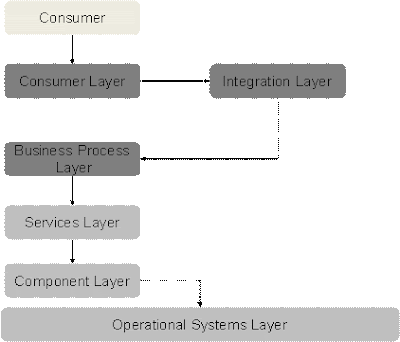
Each layer of an SOA may be described this way : Overview Capabilities supported Logical aspect (structural elements) Interaction (ABBs within/across layers) The image below depicts a typical interactions among the layers :

SOA Reference Architecture : Introduction (I)

Image
In this new series of articles, I'll present briefly the Service Oriented Architecture (SOA) concept. You can find useful information on the SOA Reference Architecture . The benefits of using an SOA approach are mainly: Reducing cost Agility Increase competitive advantage Faster time to market Consolidation of systems Better align IT to business goals The SOA Reference Architecture (SOA RA) provides an abstraction for SOA-based solutions. The SOA RA gives us an abstraction using common layers: Cross-cutting (vertical) Layers: Integration Layer : mediation / routing / protocol transformation Quality of Service Layer : manage Non Functional Requirements (NFRs) Information Layer : data needed for horizontal layer creation Governance Layer : Manage policies and business rules (registries / repositories) Functional (horizontal) Layers Operational Systems Layer : runtime environments for all layers Service Component Layer : services implementatio...

Angular: Create a workspace (Serie 1)

Prerequisites 1.1 Node.js According to the documentation , you need Node.js  (>10.9.0) installed on your computer. You can check the Node version with the following command: node -v . 1.2 npm We use the npm client command line shipped with Node.js to download and install npm packages. 1.3 Angular CLI Use the following command to install the Angular CLI globally: npm install -g @angular/cli You can find the available command reference here . Create a workspace and initial app In order to create a skeleton for an application named my-app , you only need to run the new command  as: ng new my-app The new command prompts you to select the routing mode, the style mode (css, scss...). Create a workspace under an existing folder For creating a workspace under an existing folder, do the following: open a terminal on your current folder (e.g. my-app) Run the following command : ng new my-app --directory=./ Run your app In order to buil...

Spring Service method validation

It is considered a good practice to validate the inputs of your service method. You need to first annotate your service class with @Validated . This annotation tells Spring to evaluate the constraints annotations on each method parameters. In order to avoid a ConstraintDeclarationException , your interface should also declare the constraint annotations. If the input is invalid, a ConstraintViolationException is thrown.

Spring: How to import data via CSV

In this article, I want to show you how you can import data via a CSV file in a cloud based application. Spring controller In order to upload the CSV file, we will use an HTTP POST request with mime type as multipart/form-data . This request will be processed by my spring rest controller. I will get the file via the request parameter with type :  MultipartFile . If the file content is not empty, I can extract the bytes and encode them as Base64 encoding using java 8 utility. In order to do the work outside of a user-facing request, I use the Google Cloud Platform (GCP) task queues mechanism. I can pass the encoded content as a task parameter. In parallel to the user facing request, a servlet will do the job with the specified parameter. Servlet Consumer The servlet is pretty straightforward : It extracts the encoded content It decode the encoded content It loads object list from the CSV content (jackson csv) It calls a service with the list of objects...

Spring DI in servlet

Today, I'll show you how can inject a bean into your servlet. 1. Using ServletContextListener The ServletContextListener will enable your servlets to access the Spring ApplicationContext . In your servlet : 2. Using the SpringBeanAutowiringSupport I personally prefer the following solution : thanks for sharing...

Spring JPA : Using Specification with Projection

You may probably know that using Specification with Projection is not possible at this moment. I'll show you how you can easily bypass this problem using the JPA Criteria. 1. Create an extended repository We begin by creating an extending global repository as follow : You can find more information here . 2. Add our custom method In order to limit the fields returned for each item, the consumer of my API must provide the required fields this way: /orders?fields=productId,name,quantity . ( Best Practices ) Basically, I'm defining the SELECT clause with the returned fields (cf. getSelections() ): 😎Happy coding...

Spring JPA : test interface-based projection using factory

In this short article, I'll show you how you can easily test a repository method which uses interface-based projection . Our repository: You can use the above method this ways: I use the ProjectionFactory as well as the SpelAwareProxyProjectionFactory for testing ( spring doc ). You must also provide the setters on your interface as follow: Happy reading...

JPA : How to deal with one to many association

After reading and experiencing lot of solutions for modeling a one to many association, I'll show you the ways you can REALLY do it: 1. Using bidirectional association the parent entity : As you can see, I use the @oneToMany annotation with the following properties : mappedBy --> parent property of the child cascade --> ALL by default orphanRemoval --> true by default fetch --> we use  LAZY for performance reason I use a Set for the collection. I provide also a helper method for adding a child to the parent (You can do the same for removing a child). The child entity below implements also the equals and hashCode methods: In order to retrieve the parent and the children with ONE query, we have 2 solutions: @NamedEntityGraph : this annotation tell JPA which node to load automatically.  @NamedQuery using LEFT JOIN FETCH These methods are both used in the below repository: 2. @ManyToOne ONLY in the child entity  ...

Angular 7: A template to be up to speed in no time

Today, I'll share with you an Angular 7 application from where you can start building your own. I've followed as much as possible the best practices available here . You can find the source code at this repository . If you can improve this solution, do not hesitate to tell me. 😀 Let's inspect the different parts: Core Module 1. guards I've incorporated basically 2 guards:  The AuthGuard implements both CanActivate and CanLoad . This guard is responsible for checking if the current user is authenticated and authorized. If not authenticated, the user will be redirected to the login page. If the authenticated user hasn't sufficient permission, he will be redirected to the home page. The NoAuthGuard which implements CanActivate , provides a way to restrict a route when a user is already logged in (e.g. login). 2. interceptors The ErrorInterceptor basically intercepts client errors and server side errors. When it catches a 401 or 403 ...

Angular 7 | RxJS : Test finalize()

In the following interceptor, I want to test if the method loaderService.stopLoading() is properly called : As you can see this function is called from the finalize() RxJS operator. The unit test for this interceptor is as follow: Thanks for sharing...

Angular 7: Test Error Interceptor

Testing an error interceptor can be a little tricky. Below is the code I want to test : Basically we need to perform an HTTP request and respond with a mocking error for testing this interceptor. You need also to register it in the TestBed.configureTestingModule . Thanks for sharing...

Angular Material and Bootstrap 4

For a rather large Angular project (7.2.10), I use the Angular Material components as well. As you may probably know this library does not provide out of the box a good layout system, CSS reset and utilities... So why not include these elements from the Bootstrap 4 framework ? I'll show you how you can add parts of the Bootstrap to your Angular project. Add Bootstrap to package.json You first need to include the Bootstrap to your dependencies : npm install bootstrap --save Add Bootstrap parts to the global stylesheet ( src/style.scss ) When adding the Reboot, we have to fix some issues by including : src/_variables.scss src/_reset.scss Thanks...

Angular 7: Test Guard

Image
I will show you how you can test a guard. I'd like to test the code below: We have in this code mainly 3 cases to test: The logged in user has the required role. He should be able to access the restricted area. The logged in user has NOT the required role. He should not be able to access the restricted area. The user is redirected to the home page. The user is NOT logged in. He should not be able to access the restricted area. The user is redirected to the login page. You can run your test with ng test . You should see something like that: Thanks for sharing...

Securing Spring Boot Microservices with Spring Security

Overview Basically, our microservices are secured this way : The user provides his credentials via a public endpoint If authenticated, the server returns an authentication token (JWT) The JWT is attached to each subsequent request via an HTTP header: Authorization:Bearer TOKEN You can find the source code at https://github.com/vedrax-admin/spring-microservices User Microservice This microservice uses a MySQL database. We begin by creating the Account table: Below is a script to insert some dummy data: The Account entity will be created using JPA: The account repository: User Principal We create a class named UserPrincipal which implements UserDetails . In order to be accessible by all microservices, this class is located in our shared module. JWT Token Service This service is responsible for creating expiring JWT. We can also parse a JWT for getting the UserPrincipal . We use the io.jsonwebtoken dependency for that. Account Service...

Java: How to work with streams

Filter a list and process each element Filter a list and collect the elements Transform a list Reduce a list

Java: How to use the Function interface

I'll show you how you can use the Function interface. The Function interface returns an Object of any type. The code that calls the createProductDescription uses lambda expression :